Premade Relation Pack
A Premade Relation Pack (PRP) is a whole mechanic as data: an Environment with its Stats (Counter Effects, Conditional Modifiers, Generators…), the Effects, packs, conditions and filters they use, and the relations your own Stats need to reach them (your Attack → its Conditional Modifier, your Health → its Intervener). Loading a PRP copies all of it into a Stat Repository and wires those relations — a dozen assets and their wiring in one step, wired the same way every time.
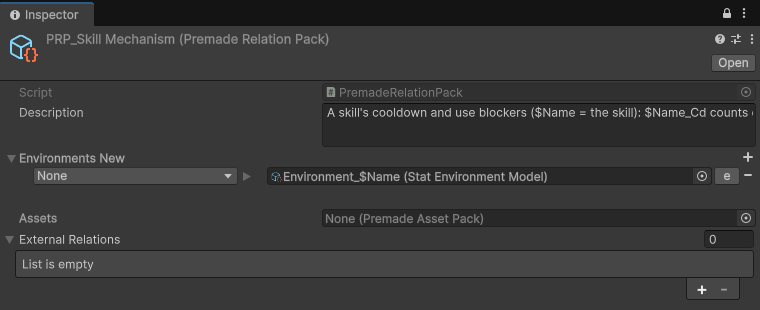
Fields
| Field | Description |
|---|---|
| Description | What the mechanic does, how to drive it (which Stat to raise), what loading wires, what you must map, and which Processors your chain needs. Each shipped pack ends with its Formula. |
| Environments New | The pack's Environments, by Environment Id. None means the Environment you load it into. |
| Assets | An optional Premade Asset Pack shipped with it (Effects, packs, Processors) — copied, not wired. |
| External Relations | Copies of your Stats (e.g. Stat_Health_XPRP) holding only the relations the pack adds to them. On load these relations are written onto your real Stats. |
The pack's external keys (Key_Health_XPRP, Key_Position_XPRP…) stand for your project's Stats.
Loading a PRP
Power Editor › Stat › Containers › Repository — select the Repository of the Actor that should get the mechanic and open Premade Relation Pack.
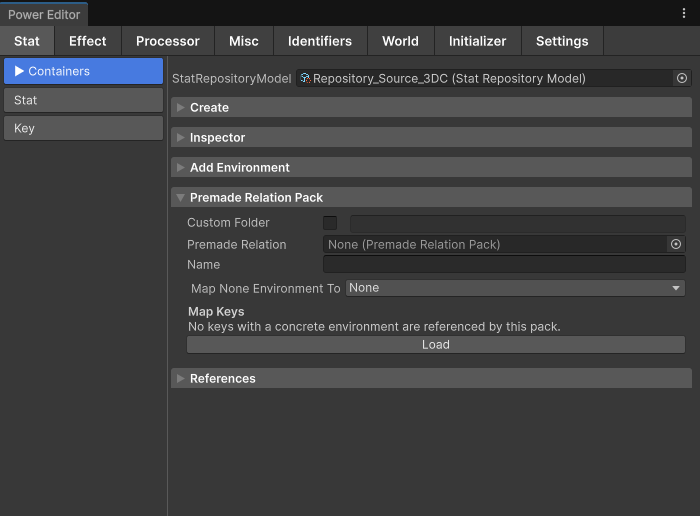
- Premade Relation — pick the pack. Read its Description first.
- Name — replaces
$Namein every asset name and new Stat Id (Attack Inflicts loaded asVenomEdgecreatesVenomEdgeUnlocked,Pack_VenomEdgeInflict…). Packs built around$Namecan be loaded several times, once per mechanic. - Environment mapping — choose where each of the pack's Environments lands: the owner's existing Environment (the stats are added to its containers — the usual case), or a new Environment (a new Environment Id mapped into the Repository — for a self-contained mechanic other Actors may map later, like a dash).
- Key mapping — every external key must name a Stat this Actor really has, at the same Environment / Container / Stat ids (lookups at runtime are by ids, not by asset). Keys found at the same ids are mapped automatically; map the rest to your own keys (your Position lives in the
MovementEnvironment). A key that stands for another Actor's Stat (the projectile a deflect turns around) is resolved in that Actor's Repository. - Custom Folder — optional destination folder.
- Load. The report lists the External relations: wired, or in need of your attention (e.g. your Stat already had a different Stat on that relation — it is turned into a SigSep list holding both).
If the Actor already has the pack's Stats, the mechanic exists — drive those Stats instead of loading a second copy. If another Actor type has it (the Player's Dash Environment), map that Environment into this Actor's Repository (Add Environment): Environments are per Actor at runtime, so each Actor gets its own values.
Packs ship switched off: their toggle or amount Stat defaults to 0. Granting the mechanic is an Effect that raises it (an upgrade, an item, a level-up).
Example
Give the Player a backstab: attacks from behind deal +50 % damage once an upgrade unlocks it.
1. Load Backstab into Repository_Player:
| Setting | Value |
|---|---|
| Premade Relation | PRP_Backstab |
| Name | Backstab |
| Environment mapping | the pack's Environment → the Player's Default Environment |
| Key mapping | Key_Attack_BackstabPRP → found automatically (Default / FloatClamped / Attack); Key_Direction_BackstabPRP → your facing Direction key, if it lives elsewhere |
2. What you get. The pack's two Stats are added to the Player's Default Environment, and the relation is written onto your own Attack:

Default (Player) Stat_BackstabDamage—
ConditionalModifier_Float — Rate 0.5, IF Source.Direction · Target.Direction ≥ 0.5- Stat_BackstabUnlocked—
Int_Clamped — 0
Attack
Key_AttackBackstabDamage3. Grant it. The pack ships switched off. The upgrade's Effect sets BackstabUnlocked to 1; from then on, every attack that uses Attack as its Attribute Stat and hits a target from behind deals +50 %.
Check that your processing chain has an AS or MAS Conditional Modifier contribution — the pack's Description lists what its chain needs.
Creating a PRP
Create a PremadeRelationPack asset, put the mechanic's Environment under Environments New (with Environment Id None for the Environment it is loaded into), and add a copy of each of your Stats that needs a relation to the pack under External Relations, holding only those relations. Use $Name in asset names for parts that must be unique per load, and write a Description that says how to drive it.
A mechanic that already works in a project can also be extracted into a pack automatically with the editor's PremadeRelationPackExtractor (Plugins/Power/Editor/Authoring, called from the Power authoring bridge): the chosen Stats and everything they reference are copied into one pack Environment, references to Stats outside the mechanic become external keys, and the relations your Stats hold on them become External Relations.
Shipped packs
Power ships 40 ready-made packs — crit, backstab, damage over time, revive, deflect, dash, skill cooldowns and more — in the Premade Packs sample (PowerSamples/PremadePacks). See Shipped Packs for every pack, sorted by name, with the Stats, relations and assets it brings.