Effect Process Flow
When an Effect is sent in Power, it does not modify a Stat directly.
Instead, it passes through a configurable processing funnel where multiple Processors can inspect, modify, block, or react to it.
 EffectBS · AS · MAS
 PreProcessProcessPostProcessDurationProcessFeedbackProcess
 Stat
StatWhich processors participate — and what they do — depends on the Effect's:
- Effect Type
- Attributes
- Target Stat
- Attribute Stats
- Stat Relationships
- Processor configuration
This architecture allows Power to implement mechanics such as immunity, counter effects, modifiers, limiters, critical hits, duration changes, and gameplay feedback without hard-coding them into individual Effects.
Effect Types
Power supports three Effect types. The difference between them is the number of Attribute Stats carried by the Effect.
| Effect Type | Target Stat | Attribute Stats |
|---|---|---|
| Base Stat Effect | 1 | None |
| Attribute Stat Effect | 1 | 1 |
| Multi Attribute Stat Effect | 1 | Multiple |
▶ Video tutorial: Effect Types
Base Stat Effect
Contains only a Target Stat — useful when the Effect doesn't need an Attribute Stat to carry extra gameplay meaning.

Health-50A simple 50-point reduction to Health.
Attribute Stat Effect
Adds a single Attribute Stat on top of the Target Stat, giving the Effect additional gameplay meaning that Processors can key off of.
HealthPhysicalAttack-50Processors can use relationships defined on PhysicalAttack to decide how to handle this Effect — for example, a target could be immune to PhysicalAttack.
Multi Attribute Stat Effect
Carries multiple Attribute Stats at once, so a single Effect can represent several gameplay classifications simultaneously:
HealthMagicAttackLightningAttackOrbAttack-100A Lightning Orb that deals Magic damage.
Each classification participates in processing independently — an Effect doesn't have to belong to exactly one category.
The Processing Funnel
Once sent, an Effect routes through the Processor funnel appropriate to its type.
▶ Video tutorial: Processing Funnel
Processor Selection
| Effect Type | Available Processors |
|---|---|
| BaseStatEffect | BaseStatEffectProcessors |
| AttributeStatEffect | BaseStatEffectProcessors + AttributeStatEffectProcessors |
| MultiAttributeStatEffect | BaseStatEffectProcessors + MultiAttributeStatEffectProcessors |
Consider:
HealthPhysicalAttackThis Effect can be affected by two independent sets of rules:
- Health may be immune to negative Effects.
- PhysicalAttack may be blocked by Physical immunity.
Both rules get a chance to process the same Effect — that's why an Attribute Stat Effect passes through both processor sets.
Effect Attributes
Every Processor shares the concept of RequiredAttributes — the Attributes it needs present on an Effect before it will run. If they're missing, the Processor is skipped and the funnel continues.
Example:
Processor: BSPreprocess_Immune
RequiredAttributes: Immunable
An Effect carrying Immunable lets this Processor run; without it, the Processor is bypassed.
Target Stat Processing
BaseStatEffectProcessors operate on the Target Stat, inspecting its relationships to decide how to handle the Effect.
HealthImmuneToNegativeHealthEffectsGiven:
Health-50BSPrecontributionProcess_ImmuneNegativeImmuneBSPrecontributionProcess_Immune uses NegativeImmuneRelativeKey / PositiveImmuneRelativeKey to pick which immunity Stat to evaluate — here, since the Effect is negative, it checks ImmuneToNegativeHealthEffects. If that Stat's value is greater than 0, the Effect is blocked:
Health doesn't need to contain immunity logic itself — the relationship tells the Processor where to look, and the Processor decides what to do.
Attribute Stat Processing
AttributeStatEffectProcessors operate on Attribute Stats. Given:
HealthPhysicalAttackASPrecontributionProcess_ImmuneImmune_ASASPrecontributionProcess_Immune inspects PhysicalAttack's relationships:
PhysicalAttackImmuneToPhysicalAttackIf the relationship exists and its value is greater than 0, the Effect is absorbed. This lets a target express rules like:
Immune to PhysicalAttack
Immune to FireAttack
Immune to SpearAttack
— without a separate hard-coded immunity system per gameplay type.
Multi Attribute Processing
The same principle extends to MultiAttributeStatEffects: instead of one Attribute Stat, the Processor evaluates the full set carried by the Effect.
HealthMagicAttackLightningAttackOrbAttackAttribute Stats are composable — an Effect can carry multiple gameplay classifications at once rather than belonging to exactly one.
Effect Process Definition
EffectProcessDefinitionModel defines the processing funnels used by Power, storing Processors in separate dictionaries per Effect type.
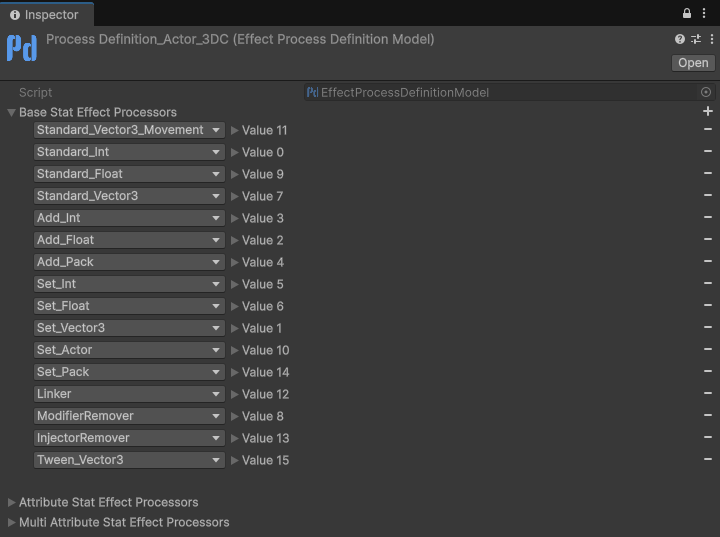
When an Effect arrives, Power resolves its Effect Type and routes it through the matching processing definition. The ProcessorId determines which funnel is used.
Processor Stages
Within each funnel, Processors are divided into stages:
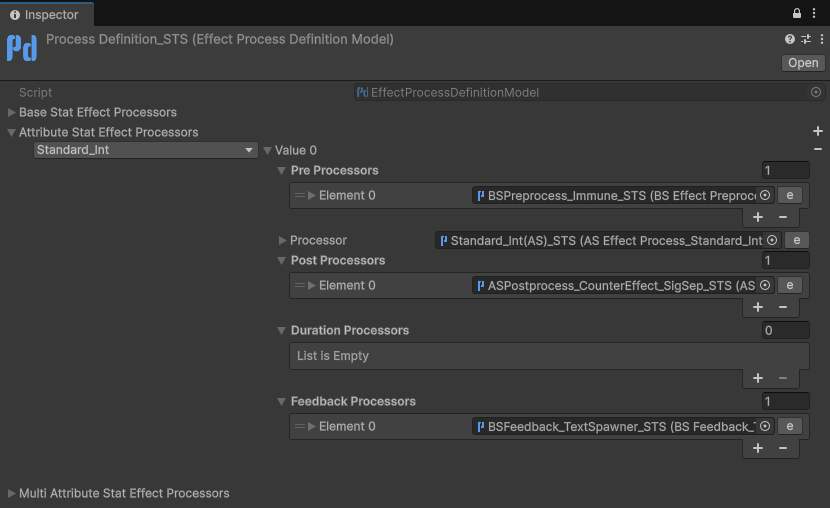
Slay The Sphere's funnel for Int Attribute Stat Effects: Immune can block the Effect before it lands, Standard_Int applies it, CounterEffect reacts to the result, and TextSpawner shows the floating number. Its Duration list is empty, which is the usual case.
See all processor types here.
PreProcessor
Runs before the Effect is applied — typically used for rules that decide whether the Effect should be blocked or continue: immunity, restrictions, direction, modifier count limits, and Intervener Effects that react before the Effect lands.
Processor
Where the Effect is actually applied to the Target Stat — e.g. Add_Float calculates and applies the final value.
Standard processors have finer-grained control via Contribution and PostContribution stages, covering:
- Modifiers
- Critical Hits
- Damage Formulas
- Shields
- Limiters
- Reflection
- Offsets
PostProcessor
Runs after the Effect was processed, for rules that depend on the outcome — e.g. triggering a counter effect.
A PostProcessor runs for applied Effects by default. Its Run On option (Applied, Blocked, or both) lets it also run when a Processor blocked the Effect, so a block can still have consequences — consuming an immune charge, starting a shield's cooldown, riposting a parried hit. Counter Effect PostProcessors always run on both and let each Counter Effect's Trigger On decide.
Blocked Effects
A block doesn't end the funnel. When a Processor refuses the Effect — immunity, a missed hit, a restriction, a shield, an Intervener Effect with Block Effect — the Effect skips the apply (and the Duration Processors), but still goes through:
The block's Result Attributes (for example Immune) travel with it, so PostProcessors and Feedback can tell what blocked the Effect. Configuration errors — a missing target Stat, no Processor for the Effect — are not blocks: nothing runs after them.
Duration Processor
Modifies the lifetime of the resulting modifier rather than its value.
Used for mechanics like increasing buff duration or reducing debuff duration.
Feedback Processor
Runs after processing completes — for applied and blocked Effects alike — turning the result into gameplay feedback: floating damage/healing numbers, VFX, SFX, combat log messages, UI notifications, custom gameplay events.
Putting It All Together
Power separates the Effect from the rules that process it:
- Stats store state.
- Relationships connect gameplay concepts.
- Attributes describe additional Effect context.
- Processors apply gameplay rules.
- Feedback communicates the result.
Together, these form the core of Power's Effect processing architecture.