Access
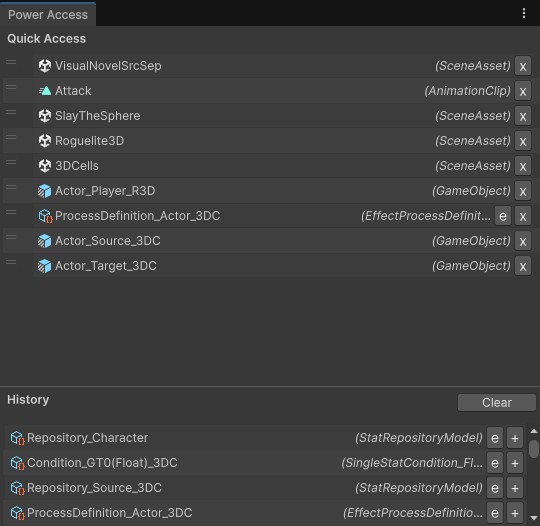
Access keeps the Power assets you work with one click away. Pin the assets you return to all the time in Quick Access, and find the ones you opened recently in History.
Open it from Tools → Power → Access.
When to use it
- You are tuning one mechanic and keep switching between the same few assets: the Stat, its Effect, the Processor that reads it.
- You opened an asset a minute ago and lost it in the Project window.
- You want to drag the same asset into many fields (an Effect into several Packs, a Key into several Conditions).
Quick Access
Drag any assets from the Project window into the Quick Access list, or press + on a row in History, Search or the Power Editor's asset list. Pins are saved per project in your editor preferences, so they survive restarts.
History
History records the Power assets you focus and the ones you create, newest first, up to 40. A selected asset is recorded once it has stayed selected for a second, so clicking through the Project window doesn't fill the list. Press Clear to empty it.
Only Power assets are recorded: Repositories, Environments, Containers, Stats, Keys, Effects, Effect Packs, Processors, Process Definitions, Conditions, Scalers, Adapters, Distributers, Injectors, Linkers, Targeting Filters, Premade Relation Packs and the World, Diplomacy, Log and Updater settings.
Rows
Every row works the same in both lists:
| Action | Does |
|---|---|
| Click | Pings the asset in the Project window. |
| Double-click | Opens the asset (its inspector, or its own editor). |
| Drag | Drops the asset into any object field or the Project window. Drag a row from History into Quick Access to pin it. |
| e | Opens the asset in the Power Editor. Hidden for assets the Power Editor doesn't show. |
| r | Opens the Stat (or the Stat a Key belongs to) in Relations. Shown only for Stats and Keys. |
| + | Pins the asset to Quick Access (History rows). |
| x | Unpins the asset (Quick Access rows). |
Ctrl/Cmd + L opens the newest History entry in the Power Editor, wherever you are. See Shortcuts and Menu Items.