Editor
The Power Editor is the main window you'll use while working with Power.
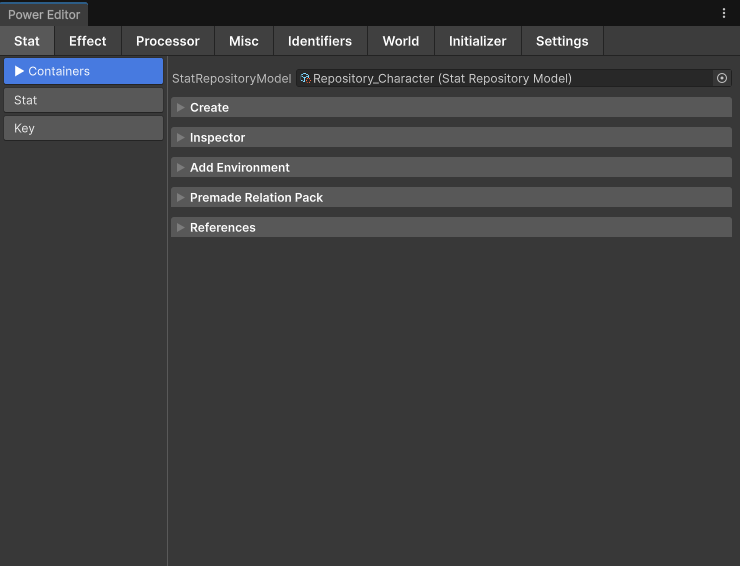
Power is built around creating assets and connecting them together to create the game mechanics you need.
Although every Power asset can be created from the Assets → Create → Power menu, the Power Editor makes it much easier to create, organize, and manage your Power assets.
Open it from Tools → Power → Editor (Ctrl/Cmd + E). Select any Power asset and press Ctrl/Cmd + G (Assets → Open in Power Editor) to jump to it. Ctrl/Cmd + L reopens the asset you opened last.
Tabs
| Tab | Contains |
|---|---|
| Stat | Repositories, Environments, Containers, Stat Definitions, Keys. |
| Effect | Effect Packs and every Effect type (Stat Effects, Injector, Linker, Remover, Timer Modifier, Tween, Conditional). |
| Processor | Process Definitions and every Processor stage. |
| Misc | Stat Conditions, Stat Scalers, Adapters, Value Distributers, Injectors / Linkers, Custom Targeters, Targeting Filters, Premade Relation / Asset Packs. |
| Identifiers | The identifier databases: StatId, ContainerId, EnvironmentId, StatTags, RelativeStat, InjectorTag, EffectAttribute, EffectResultAttribute, ProcessorId, UpdaterType, ActorExtensionId, ActorPartId, RelationState, ActorId. |
| World | World Settings, Diplomacy (Settings, Provider, Definition), Log, Updater. |
| Initializer | The project initializer (creates the default databases, the world settings and a Quick World Initializer for the scene) and the Sample Importer. |
| Settings | Save Folders and Naming Conventions for created assets, Icons. |
Working on a Stat
Selecting a Stat Definition in the Stat tab shows its inspector and these tools:
| Foldout | Does |
|---|---|
| Create | Creates the Stat with its Key, registers it in a Container and fills obvious fields (autofill). |
| Link | Link To Stat: links this Stat into another with a chosen Linker. Same Environment: a Linker Definition on the target. Different Environments: a Linker Effect in the source Environment's linker Effect Bundle. See Injector. |
| Convert | Changes the Stat's kind in place and re-points everything that referenced it: Normal ↔ SigSep list, Normal ↔ SrcSep, Unsigned ↔ Signed (Modifier, Conditional Modifier, Counter, Intervener, Director), Counter Effect ↔ Intervener Effect. You still add the matching Processors to the chains that read it. |
| Delete | Deletes the Stat together with its Key and lists what still references them. |
| References | Every asset that uses the Stat or its Key. |
Effects have a similar Convert (BS ↔ AS ↔ MAS), and Repositories have Premade Relation Pack (load a PRP) and Add Environment; Environments and Containers have Add Container, Add Stat, Add Inner Container / Add Inner Stat for SigSep and SrcSep.
Other windows
| Window | Use it to |
|---|---|
| Access | Pin the assets you keep coming back to and return to the ones you opened recently. |
| Flow | Trace how an Effect runs through the Processors at runtime, and apply Effects from the editor. |
| Relations | See the relation graph of one or more Stats before you change them. |
| Search | Find Stats by name inside an Environment or Repository. |
| Validator | Find setup mistakes before they show up at runtime. |
| Orphans | Find and clean up Power assets nothing references. |
| Build Mechanic Runs | See what your AI agent runs cost, per agent and per step. |
Every shortcut and menu item is listed in Shortcuts and Menu Items.