Skill
The Skill system is designed to support modern gameplay mechanics such as multi-state skills, different input systems, animation systems, and animation canceling. It is highly dynamic and extensible, allowing it to adapt to a wide variety of game designs.
Skills are divided into two types:
- Normal Skill
- Evolver Skill
The difference between them is the number of States they contain.
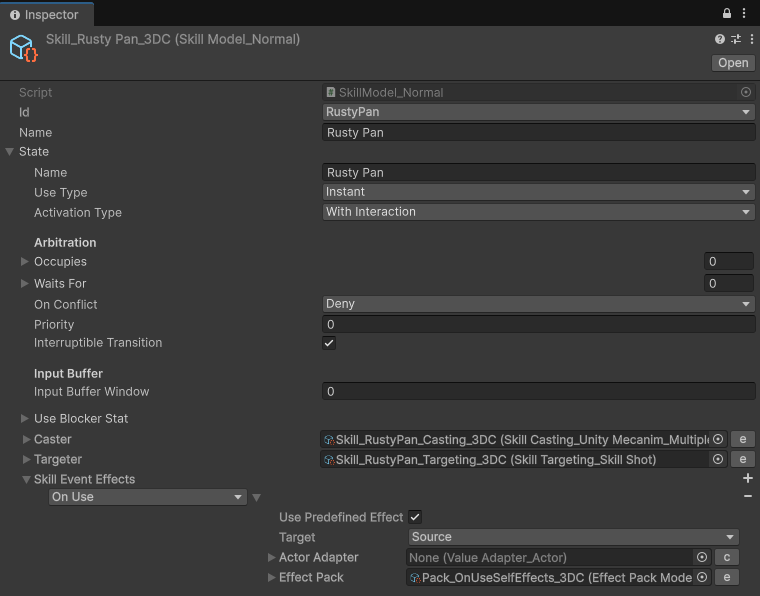
- A Normal Skill consists of a single State.
- An Evolver Skill consists of multiple States.
A State defines how a Skill behaves, including its activation conditions, casting behavior, and targeting logic. See Skill State.
The pieces
| Piece | Asset / component | Role |
|---|---|---|
| Skill | SkillModel_Normal / SkillModel_Evolver (Create › Power Demos › Skills › Types) | The skill: its Skill Id, Name and its State(s). An Evolver also has a State No Stat that picks the active State. |
| Skill State | inside the Skill | When it may run, which body channels it occupies, how it is cast, how it delivers its Effects, and which Effect Packs fire at each step. |
| Casting Model | SkillCasting_* asset (… › Skills › Casting) | How the State is cast: an animation, a direct trigger. See Casting Model. |
| Targeting Model | SkillTargeting_* asset (… › Skills › Targeters) | How the Effects reach targets: a spawned skill object (projectile, area) or directly. See Targeting Model. |
| Skill Container | SkillContainerModel (… › Skills › Skill Container) | A list of Skills given to an Actor at once. |
| Skill Controller | ActorExtension_SkillController on the Actor | Owns and runs the Actor's Skills and decides which may run at the same time. See Skill Controller. |
| Activators | ActorExtension_KeyMappedSkillActivator, ActorExtension_NumericalSkillActivator, SkillElementExtension_ButtonActivator, ActorExtension_RepeatSkills | Turn input (or a timer) into skill uses. |
| Skill object | SkillEntity prefab + Skill Extensions | The spawned projectile / area, with its Effectors and behaviours. |
Normal Skill
Evolver Skill
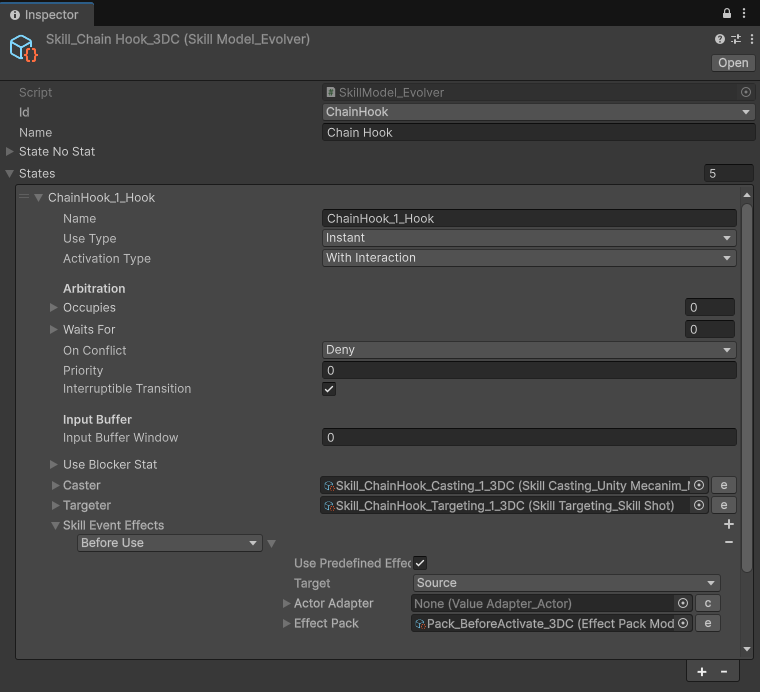
State Transitions
State transitions are driven entirely by the value of the StateNoStat (the Evolver's State No Stat).
When the stat changes while the current State is still casting, the transition is queued and applied the moment the cast finishes, so a stat change never cuts a running animation in half (unless the Casting Model has Allow Switch State While Casting). A use pressed meanwhile goes to the State being switched to.
Since StateNoStat is just another Stat, it can be modified by any logic you create with Power. This makes Evolver Skills extremely flexible and allows you to build a wide variety of gameplay mechanics.
Examples
Sequential State Progression
Increment the StateNoStat after each activation to cycle through different Skill States.
See the Legion Spear sample.
Charge Skills
Use States to represent different charge levels.
-
Deadeye String
- Holding the input (
Pointer Down) starts charging. - Releasing the input (
Pointer Up) switches to the firing State.
- Holding the input (
-
Stormchannel
- Charges while the input is held.
- Transitions through multiple States as the charge value reaches predefined thresholds.
Conditional State Transitions
Change States dynamically based on gameplay conditions.
-
Chain Hook
- After the hook connects, clicking again transitions to either Kick or Punch depending on the distance to the target.
-
Venomfang Blade
- If the target is far away, the Skill first performs a dash to the target.
- If the target is already nearby, it immediately transitions to the attack State.
Skill Levels
States can also represent Skill levels.
The StateNoStat can be used directly as the Skill level, allowing each level to execute a completely different State and behavior.